Jumat, 25 Maret 2011

ListView & Listbox

Buat Program yang outputnya seperti gambar

Listing programnya:

Public Class Form1
    Dim listtxt(3) As String ' pendeklarasian variable 
    Dim listitem As ListViewItem


    Private Sub Button1_Click(ByVal sender As System.Object, ByVal e As System.EventArgs) Handles Button1.Click
        'memasukkan nilai ke variabel array
        listtxt(0) = Trim(TextBox1.Text)
        listtxt(1) = Trim(TextBox2.Text)
        listtxt(2) = Trim(TextBox3.Text)
        'utk memasukkan ke listview dari variable array
        listitem = New ListViewItem(listtxt)


        ListView1.Items.Add(listitem)


    End Sub
    'setting kolom listview
    Sub setlistview()
        ListView1.View = View.Details
        'utk menetukan kolom
        ListView1.Columns.Add("NPM", 100, HorizontalAlignment.Center)
        ListView1.Columns.Add("Nama", 200, HorizontalAlignment.Center)
        ListView1.Columns.Add("Alamat", 250, HorizontalAlignment.Center)


    End Sub


    Private Sub Form1_Load(ByVal sender As System.Object, ByVal e As System.EventArgs) Handles MyBase.Load
        Call setlistview()'memanggil procedure 


    End Sub


    Private Sub ListView1_ItemSelectionChanged(ByVal sender As Object, ByVal e As System.Windows.Forms.ListViewItemSelectionChangedEventArgs) Handles ListView1.ItemSelectionChanged
        TextBox4.Text = e.Item.Text
        'untuk memasukkan nilai kolom pertama ke dalam texbox4
    End Sub


End Class

Listbox
Buat tampilan seperti ini:


souce code:


Public Class Form2
  
    Sub pros3()
        ListBox1.Items.Add(TextBox3.Text + " " + TextBox4.Text + " " + TextBox5.Text + " " + TextBox6.Text + " " + TextBox7.Text)
    End Sub


    Private Sub TextBox3_KeyPress(ByVal sender As Object, ByVal e As System.Windows.Forms.KeyPressEventArgs) Handles TextBox3.KeyPress
        If e.KeyChar = Chr(13) Then
            TextBox4.Focus()
        End If
    End Sub


    Private Sub TextBox4_KeyPress(ByVal sender As Object, ByVal e As System.Windows.Forms.KeyPressEventArgs) Handles TextBox4.KeyPress
        If e.KeyChar = Chr(13) Then
            TextBox5.Focus()
        End If
    End Sub


    Private Sub TextBox5_KeyPress(ByVal sender As Object, ByVal e As System.Windows.Forms.KeyPressEventArgs) Handles TextBox5.KeyPress
        If e.KeyChar = Chr(13) Then
            TextBox6.Focus()
        End If
    End Sub


    Private Sub TextBox6_KeyPress(ByVal sender As Object, ByVal e As System.Windows.Forms.KeyPressEventArgs) Handles TextBox6.KeyPress
        If e.KeyChar = Chr(13) Then
            TextBox7.Focus()
        End If
    End Sub


    Private Sub TextBox7_KeyPress(ByVal sender As Object, ByVal e As System.Windows.Forms.KeyPressEventArgs) Handles TextBox7.KeyPress
        If e.KeyChar = Chr(13) Then
            Call pros3()
            Call bersihpros()
            TextBox3.Focus()
        End If
    End Sub


    Sub bersihpros()
        TextBox3.Text = ""
        TextBox4.Text = ""
        TextBox5.Text = ""
        TextBox6.Text = ""
        TextBox7.Text = ""
    End Sub


End Class

Minggu, 13 Maret 2011

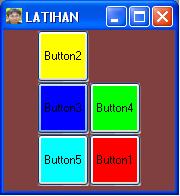
Membuat Tombol yang berpindah pindah

Kita akan berlatih membuat tombol yang berpindah-pindah..
Misal ada 6 kotakan... kotak 1 sampai lima ada tombolnya yang telah diwarnai... sedang kotak yang ke enam kosong... ketika salah satu dari tombol itu diklik maka tombol akan menempati posisi yang kosong...
misal... tombol satu diklik... maka tombol satu itu akan menempati posisi di kotak no enam, lalu klo tombol kedua diklik maka tombol 2 akan menempati posisi kotak no satu yang kosong.. begitu seterusnya..
Lihat gambar....

Listing programnya:
Public Class Form1
    Dim vButton As System.Windows.Forms.Button
    'buat variabel general utk menyimpan tombol yang invisible, misal vButton
'buat procedure aktif untuk memindah tulisan dan warna tombol ke lokasi yang kosong(tombol yang invisible)

Sub aktif(ByVal b As System.Windows.Forms.Button)
        vButton.Visible = True
        vButton.Text = b.Text
        vButton.BackColor = b.BackColor
        b.Visible = False
    End Sub

Private Sub Button1_Click(ByVal sender As System.Object, ByVal e As System.EventArgs) Handles Button1.Click, Button6.Click, Button5.Click, Button4.Click, Button3.Click, Button2.Click
        Call aktif(sender)
        vButton = sender
'panggil procedure aktif
'ganti variable vButton
        
    End Sub

    Private Sub Form1_Load(ByVal sender As Object, ByVal e As System.EventArgs) Handles Me.Load
        vButton = Button6
'setting awal tombol 6 di invisible
    End Sub
End Class

cara lain yang lebih panjang tapi secara logika lebih mudah dimengerti:

Public Class Form1


    Private Sub Button1_Click(ByVal sender As System.Object, ByVal e As System.EventArgs) Handles Button1.Click
       'cara 1 masukkan kode ini di setiap tombol, dan ganti tombol yang visible dan invisible
'warna tolbol belum dimasukkan

        'If Button2.Visible = False Then
        '    Button2.Visible = True
        '    Button2.Text = Button1.Text
        '    Button1.Visible = False
        'ElseIf Button3.Visible = False Then
        '    Button3.Visible = True
        '    Button3.Text = Button1.Text
        '    Button1.Visible = False
        'ElseIf Button4.Visible = False Then
        '    Button4.Visible = True
        '    Button4.Text = Button1.Text
        '    Button1.Visible = False
        'ElseIf Button5.Visible = False Then
        '    Button5.Visible = True
        '    Button5.Text = Button1.Text
        '    Button1.Visible = False
        'ElseIf Button6.Visible = False Then
        '    Button6.Visible = True
        '    Button6.Text = Button1.Text
        '    Button1.Visible = False
        'End If
        '===========================sampai sini cara panjang 1;
        'cara 2
        '===========================
        Call aktif(Button1)
        'panggil prosedur aktif, buat disemua tombol seperti ini

    End Sub

'buat prosedure aktif
Sub aktif(ByVal b As System.Windows.Forms.Button)


        If Button1.Visible = False Then
            Button1.Visible = True
            Button1.Text = b.Text
            Button1.BackColor = b.BackColor
            b.Visible = False
        ElseIf Button2.Visible = False Then
            Button2.Visible = True
            Button2.Text = b.Text
            Button2.BackColor = b.BackColor
            b.Visible = False
        ElseIf Button3.Visible = False Then
            Button3.Visible = True
            Button3.Text = b.Text
            Button3.BackColor = b.BackColor
            b.Visible = False
        ElseIf Button4.Visible = False Then
            Button4.Visible = True
            Button4.Text = b.Text
            Button4.BackColor = b.BackColor
            b.Visible = False
        ElseIf Button5.Visible = False Then
            Button5.Visible = True
            Button5.Text = b.Text
            Button5.BackColor = b.BackColor
            b.Visible = False
        ElseIf Button6.Visible = False Then
            Button6.Visible = True
            Button6.Text = b.Text
            Button6.BackColor = b.BackColor
            b.Visible = False
        End If

    End Sub

    '==================== sampai sini cara 2
End Class


Jumat, 04 Maret 2011

Tugas 3 Maret 2011

1. Buatkan program menampilkan bilangan,  yang habis dibagi 7 dan habis dibagi 4 mulai 1-100
2. Tampilkan bilangan yang sisa hasilnya 3 jika pembaginya 4, mulai 1-100
------
Listing programnya:

1.
Public Class Form1


    Private Sub Button1_Click(ByVal sender As System.Object, ByVal e As System.EventArgs) Handles Button1.Click
        Dim i As Integer
        ListBox1.Items.Clear()
        For i = 1 To Val(TextBox1.Text)
            If (i Mod 7 = 0) And (i Mod 4 = 0) Then
                ListBox1.Items.Add(i)
            End If
        Next
    End Sub
End Class

Keterangan
ListBox1.Items.Clear()
ini untuk membersihkan nilai yang ada di ListBox1
For i = 1 To Val(TextBox1.Text) 
ini untuk loopingdari 1 sampai nilai di textbox1

   If (i Mod 7 = 0) And (i Mod 4 = 0) Then
                ListBox1.Items.Add(i)
            End If

Jika i dibagi 7 sisanya nol dan i dibagi 4 sisanya nol maka tambahkan nilai i ke listbox1
hasil:


2.
Listing programnya


Public Class Form2


    Private Sub Button1_Click(ByVal sender As System.Object, ByVal e As System.EventArgs) Handles Button1.Click
        Dim i As Integer
        ListBox1.Items.Clear()
        For i = 1 To Val(TextBox1.Text)
            If (i Mod 4 = 3) Then
                ListBox1.Items.Add(i)
            End If
        Next
    End Sub
End Class

Keterangan:

ListBox1.Items.Clear()
ini untuk membersihkan nilai yang ada di ListBox1
For i = 1 To Val(TextBox1.Text) 
ini untuk loopingdari 1 sampai nilai di textbox1
   If (i Mod 4 = 3) Then
                ListBox1.Items.Add(i)
            End If

Jika i dibagi 4 sisanya tiga maka tambahkan nilai i kedalam listbox1

Hasil

Operasi Perulangan

Operasi Perulangan dengan for....
contoh 1 . menampilkan bilangan genap
cuplikan program

Public Class Form1

Private Sub Button2_Click(ByVal sender As System.Object, ByVal e As System.EventArgs) Handles Button2.Click
        Dim i As Integer
        ListBox1.Items.Clear()
        For i = 1 To Val(TextBox1.Text)
            If i Mod 2 = 0 Then
                ListBox1.Items.Add(i)
            End If
        Next
    End Sub
End Class

Hasilnya


contoh 2 Menampilkan bilangan   4,7,8,14,16,28,32,56...

Listing programnya:

Public Class Form2

 Private Sub Button2_Click(ByVal sender As System.Object, ByVal e As System.EventArgs) Handles Button2.Click
        Dim i, u, y As Integer
        u = 4
        y = 7
        For i = 1 To Val(TextBox1.Text)
            If i Mod u = 0 Then
                ListBox1.Items.Add(i)
                u = i
            Else
                If i Mod y = 0 Then
                    ListBox1.Items.Add(i)
                    y = i


                End If
            End If
        Next
    End Sub
End Class


Hasil:


Jumat, 25 Februari 2011

Input Data

Input data sederhana
Langsung latihan saja... buat project baru...buat form sehingga hasilnya outputnya nanti seperti gambar


Listing programnya:


Public Class Form1


    Private Sub Button1_Click(ByVal sender As System.Object, ByVal e As System.EventArgs) Handles Button1.Click
        Dim s As String
        s = 6
        If TextBox1.Text = "TI" Then
            TextBox2.Text = "Tehnik Informatika" + Trim(s)
        Else
            If TextBox1.Text = "SI" Then
                TextBox2.Text = "Sistem Informatika"
            End If
        End If
    End Sub


    Sub perintah()
        Dim s As String
        s = 6
        If TextBox1.Text = "TI" Then
            TextBox2.Text = "Tehnik Informatika" + Trim(s)
        Else
            If TextBox1.Text = "SI" Then
                TextBox2.Text = "Sistem Informatika"
            End If
        End If
    End Sub


    Private Sub Button2_Click(ByVal sender As System.Object, ByVal e As System.EventArgs) Handles Button2.Click
        Call perintah()


    End Sub


    Private Sub Button3_Click(ByVal sender As System.Object, ByVal e As System.EventArgs) Handles Button3.Click


        ListBox1.Items.Add(TextBox3.Text + " " + TextBox4.Text _
        + " " + TextBox5.Text + " " + TextBox6.Text _
        + " " + TextBox7.Text)


    End Sub
    Sub TAMBAHLIST()
        ListBox1.Items.Add(TextBox3.Text + " " + TextBox4.Text _
       + " " + TextBox5.Text + " " + TextBox6.Text _
       + " " + TextBox7.Text)
    End Sub
    Private Sub TextBox3_KeyPress(ByVal sender As Object, ByVal e As System.Windows.Forms.KeyPressEventArgs) Handles TextBox3.KeyPress
        If e.KeyChar = Chr(13) Then
            TextBox4.Focus()
        End If
    End Sub


    Private Sub TextBox4_KeyPress(ByVal sender As Object, ByVal e As System.Windows.Forms.KeyPressEventArgs) Handles TextBox4.KeyPress
        If e.KeyChar = Chr(13) Then
            TextBox5.Focus()
        End If
    End Sub


    Private Sub TextBox5_KeyPress(ByVal sender As Object, ByVal e As System.Windows.Forms.KeyPressEventArgs) Handles TextBox5.KeyPress
        If e.KeyChar = Chr(13) Then
            TextBox6.Focus()
        End If
    End Sub


    Private Sub TextBox6_KeyPress(ByVal sender As Object, ByVal e As System.Windows.Forms.KeyPressEventArgs) Handles TextBox6.KeyPress
        If e.KeyChar = Chr(13) Then
            TextBox7.Focus()
        End If
    End Sub


    Private Sub TextBox7_KeyPress(ByVal sender As Object, ByVal e As System.Windows.Forms.KeyPressEventArgs) Handles TextBox7.KeyPress
        If e.KeyChar = Chr(13) Then
            Call TAMBAHLIST()


            TextBox3.Text = ""
            TextBox4.Text = ""
            TextBox5.Text = ""
            TextBox6.Text = ""
            TextBox7.Text = ""


            TextBox3.Focus()
        End If
    End Sub


    Private Sub Button4_Click(ByVal sender As System.Object, ByVal e As System.EventArgs) Handles Button4.Click
        ListBox1.Items.Clear()


    End Sub
End Class

Sabtu, 19 Februari 2011

Variabel Public, General dan Lokal di Visual Basic

Variabel Public adalah variabel yang bisa digunakan ke semua program/form (dalam 1 project).
Variabel General adalah variabel dimana variabel bisa digunakan/dipanggil dalam 1 class/1 form
Variabel Lokal adalah variabel yang bisa dibaca/dipanggil pada satu private/ satu sub/satu procedur saja.

Contoh:

Module Module1
    Public varPublic1 As String

End Module

Public Class Form1
    Dim varGeneral As String


    Private Sub Button1_Click(ByVal sender As System.Object, ByVal e As System.EventArgs) Handles Button1.Click
        Dim varLocal As String
        varLocal = "ini variable local"
        varGeneral = "ini variable General diisi dari button1"
        varPublic1 = "ini variable Public diisi dari button1"

        MsgBox(varLocal)

    End Sub

    Private Sub Button2_Click(ByVal sender As System.Object, ByVal e As System.EventArgs) Handles Button2.Click

        MsgBox(varGeneral)
        MsgBox(varpublic1)
    End Sub

Jumat, 11 Februari 2011

SEJARAH VISUAL BASIC


Visual Basic berawal dari bahasa BASIC yang dikembangkan mulai dari tahun 1963. BASIC adalah singkatan dari Beginner’s All Purpose Symbolic Instruction Code. Sesuai namanya, bahasa BASIC dibuat untuk tujuan memudahkan pengguna
agar dapat dengan mudah mempelajari, membuat, dan mengembangkan program komputer. Visual Basic merupakan pengembangan lebih lanjut dari bahasa BASIC yang dilakukan oleh Microsoft. Visual Basic ditujukan sebagai perangkat untuk membuat dan mengembangkan program secara cepat (Rapid Application Development: RAD). Terutama jika menggunakan antarmuka berbasis windows (Graphical User Interface: GUI). Visual Basic 1.0 merupakan versi pertama Visual Basic dan dirilis pada tahun 1991. Visual Basic 1.0 ditujukan untuk sistem operasi Microsoft DOS. Selanjutnya diteruskan dengan Visual Basic 2.0 di tahun 1992, versi 3.0 tahun 1993, versi 4.0 tahun 1995, versi 5.0 tahun 1997, dan versi 6.0 tahun 1998.
Visual Basic 6.0 sangat populer dan masih banyak dipakai hingga saat ini. Sayangnya, dukungan terhadap Visual Basic 6 telah dihentikan oleh Microsoft mulai bulan Maret 2008. Namun, program yang dibuat dengan Visual Basic 6 masih dapat dijalankan pada sistem operasi terbaru seperti Windows Server 2008 maupun Windows Vista.


Visual Basic .NET diluncurkan Februari 2002, merupakan penerus dari Visual Basic 6.0 dan menggunakan platform .NET yang berbeda dengan Visual Basic sebelumnya.


Pemrograman dengan Visual Basic 2008
Ada beberapa terminologi yang sebaiknya diketahui dengan jelas.
- Visual Basic, merupakan bahasa dan aturan pemrograman yang harus ditaati dalam menuliskan perintah-perintah agar program dapat dikompilasi.
- Visual Studio 2008, merupakan aplikasi IDE (Integrated Development Environment) yang digunakan untuk mengembangkan software. Di dalam aplikasi IDE inilah tersedia berbagai fitur yang memudahkan pemrograman, seperti kompilasi, debugging, pengaturan projek, mengedit antarmuka secara visual, dll. Selain dengan Visual Studio 2008, Anda juga dapat menggunakan aplikasi IDE yang gratis tanpa biaya, yaitu dengan Visual Basic 2008 Express Edition. Aplikasi ini dapat diunduh (download) di internet melalui situs http://www.microsoft.com/exPress/download/. Bahasa untuk Visual Basic terus berkembang bersamaan yang dirilisnya aplikasi IDE terbaru. Aplikasi IDE untuk 


Visual Basic terus dikembangkan mulai dari versi 2002, 2003, 2005, dan 2008. Versi yang lebih baru dari Visual Basic hadir dengan perbaikan, serta aplikasi IDE yang lebih mudah dan lengkap.


NET Framework, merupakan library dan virtual machine yang terus berkembang mengikuti teknologi terbaru. Versi .NET Framework dimulai dari versi 1.0, 1.1, 2.0, 3.0, dan 3.5. Versi .NET yang terbaru biasanya dirilis dengan perbaikan serta dukungan terhadap teknologi baru sehingga semakin memudahkan pengembangan software.


Visual Studio 2008
Visual Studio 2008 hadir dengan beberapa versi, yaitu:
- Team System, didesain untuk pemrograman di lingkungan korporasi dengan jumlah programmer yang besar.
- Professional Edition, didesain untuk pemrograman yang melibatkan sedikit programmer 
- Standard Edition, didesain untuk pemrograman standar yang bukan enterprise.
- Express Edition, didesain untuk pemula yang baru belajar dan hobi dengan fasilitas yang sangat terbatas. Visual Studio tidak hanya mendukung bahasa Visual Basic saja, namun juga bahasa lain. Terutama C++ dan C#.


sumber:http://www.scribd.com